AI agent approval workflow for CRM: an alert isn't a gate
An AI agent proposes a CRM change. A person approves the exact field change, and the write counts as applied only after a read-back confirms the approved value.
By Will Foster
On this page
Before an AI agent updates a CRM record, have a person approve the exact field change against the current value and the evidence behind it. Keep proposed, approved and applied as separate states: approval releases only that change, and the write counts as applied only when a read-back confirms the approved value. An alert counts as a gate only when the reviewer's answer can stop the write.
The risk is concrete. A builder in a r/hubspot thread on agents that write back into HubSpot reported that, with no AI provider configured, their worker produced fabricated analysis and wrote it into the CRM as real data. Their fix was to make every write a proposal first.
I plan demo videos about AI agents that work leads, and the scene I care about most is the one where a person looks at what the agent wants to change and decides. That scene only means something if the person can say no without having to trust the agent's account of its own work. An AI agent helped research and draft this piece, so the same rule applies here: check the linked sources, not my summary of them.
When a Slack message counts as approval
A message that says an action is pending is only a gate if the reply controls whether the action runs. That is the line between an approval workflow for AI-generated changes and a status update about them.
The clearest example I found is a r/aiagents thread about an n8n CRM agent that asks for approval. The builder describes rules that route deletes, large deals and unclear requests to a pending-approval state and post a Slack message about them. They also say that, for now, nothing flows back from Slack. That is their own report, and the thread shows no unapproved write going through. What it does show is the gap: a message reached a person, and the person's answer had no path back to the thing being approved.
Compare that with a workflow step that is built to wait. Microsoft's Power Automate guide to creating and testing an approval workflow documents an action called "Start and wait for an approval". The name says it. The flow sends the request and holds until a decision comes back, so the decision sits on the path the action has to take.
Agent builders now hand you both pieces separately. Avoma's Agent Builder announcement, published November 12, 2026, lists CRM field updates and Slack or Teams alerts among the actions an agent can take. The post makes no claim either way about gating. What it shows is that a write and an alert arrive as separate building blocks, so the gate is something a team has to design on purpose.
People already understand this ordering. A connector who asks for consent before a warm introduction waits for the yes before writing the introduction, because only the yes counts as permission. Software needs the same property: the answer has to arrive before the action, and it has to be able to stop it.
Slack can still be part of a real gate. If pressing approve in Slack is what releases the write, and no other path can make the write happen, the gate is real. The test is whether the decision controls the write.
AI agent approval workflow: proposed, approved and applied
So what exactly is being approved? Proposed, approved and applied are three different states, and each one needs its own evidence. The HubSpot builder describes each write passing through pending, approved and applied, with a per-agent choice of dry run, approval or auto mode. Nobody has tested that setup independently, but the separation is the useful idea.
- Proposed means the agent has prepared an exact change: this record, this field, from this value to that value, because of this evidence. Nothing in the CRM has moved.
- Approved means a named person has authorized that specific change. It is a decision, and the record still holds the old value.
- Applied means the write ran and a read-back found the approved value in the field. A write call that returned without error only tells you the request was accepted.
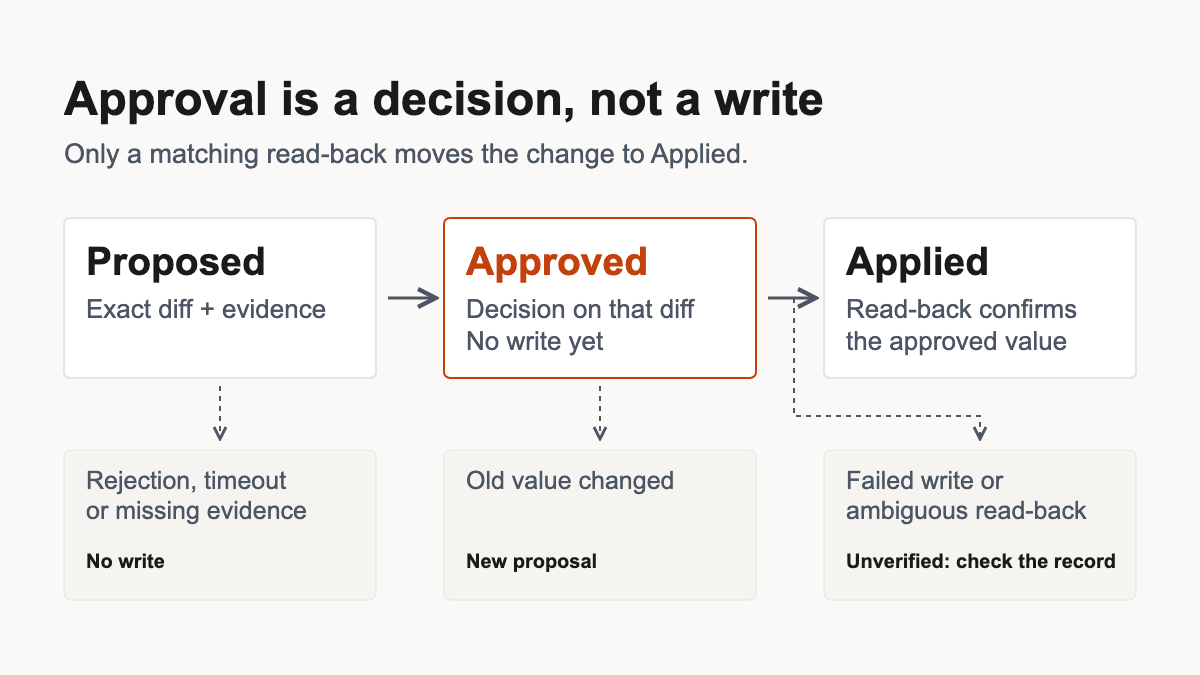
The failure branches matter as much as the happy path. A rejection, a timeout or missing evidence should end with no write. None of them should quietly turn into approval. A failed write, a conflict or an ambiguous read-back leaves the change unverified, and the log should say so in those words. An ambiguous read-back means someone needs to look at the record, because the write may or may not have landed.
What if someone edits the record while the approval is pending?
If the current field value differs from the old value the reviewer approved, stop and ask for fresh approval. That is my design recommendation, and the reason is simple. The reviewer approved a change from a specific old value to a new one. If a rep has since updated the field, writing the new value would overwrite a human edit nobody reviewed. Show the reviewer the current value and ask again. If your CRM cannot check the current value before writing, route that kind of change to a person to make by hand.
What the reviewer needs to see
A reviewer should see the record, the field, the value before, the value after and the source the agent relied on. An approval is only as good as what the reviewer could see when they gave it, and that view is what keeps a human in the loop for high-impact AI agent writes.
In the n8n thread, a commenter asked whether reviewers see independent evidence. The builder's answer was that reviewers currently see the requester, the action and its target, the agent's summary and the rule that triggered review. They do not see the original request or the live record. Again, that is one builder describing their own setup. It is still a useful warning, because a summary written by the agent is the one piece of evidence the agent controls completely. The HubSpot case shows why that matters: fabricated analysis can read just as fluently as real analysis.
A review card that lets a person check the change for themselves carries:
- the record and the field being changed
- the value the field holds now
- the value the agent wants to write
- the evidence the agent used, as a link or a short excerpt
- what triggered the proposal, such as a reply, a meeting note or a rule
Separating what was observed from what was concluded is the same discipline you use to qualify a warm lead before following up. It also marks a boundary worth keeping: approval for a follow-up message covers that message, and editing the record it came from needs a decision of its own.
For a narrower example of the habit, HeyWarmLead can hold agent-prepared touchpoints in a pending_approval status, where a reviewer approves or rejects them from a queue. That applies to touchpoints only. General CRM field changes sit outside it, and the control this piece describes covers more ground.
Which CRM fields should still need a person?
Some fields can skip the queue. Sort them by what a change can set off and whether you can take it back; the field type on its own tells you little.
The HubSpot builder, replying to a commenter, keeps owner, stage and amount on approval and treats things like scores, labels or notes as candidates for auto mode. Those are one practitioner's choices. A broader argument for the same sorting comes from Matt Cooke, a Proofpoint strategist, in a TechRadar Pro opinion piece on agentic AI and enterprise security published October 5, 2026: an agent with permission to act can still act outside human intent, and the consequences and reversibility of an action matter.
Here is how that sorting can look for AI-generated CRM updates. The entries are examples built from the HubSpot builder's list plus my own inference, and nobody has measured them. Your automations and how reversible a change really is can move an entry to a different route, so check each one against your own CRM before you adopt it.
- Deal stage. What it can set off: forecast categories, stage-based automations, handoffs. Easy to undo? The value, yes. Automations that already fired, often not. What the reviewer needs: current and proposed stage, and the evidence for the move. Suggested route: approval.
- Opportunity amount. What it can set off: forecast totals and the reports people decide from. Easy to undo? The value, yes. Decisions already made from the report, no. What the reviewer needs: current and proposed amount, and the source message or document. Suggested route: approval.
- Record owner. What it can set off: routing, notifications to the new owner, territory reports. Easy to undo? Partly. The new owner may already have acted. What the reviewer needs: current and proposed owner, and the reason for the change. Suggested route: approval.
- Append-only activity note with a source link. What it can set off: usually nothing, if no automation reads notes. Easy to undo? Yes, when it adds rather than overwrites. What the reviewer needs: the link the note cites. Suggested route: auto-write candidate after a dry run.
- AI score or label. What it can set off: whatever views, filters or sequences read it. Easy to undo? The value, yes. Anything that acted on it, no. What the reviewer needs: what the score or label is based on. Suggested route: auto only if nothing consequential reads it.
Notes and labels earn auto-write status case by case. A label that feeds a sequence or a view your team works from behaves more like a stage change. And a field that looks minor can still change how people read the pipeline: if the agent records the wrong outcome on a deal, that can distort how the team reads recency and outcome in the pipeline when it decides who needs attention.
Who should approve a change that moves the forecast?
A named, accountable owner for each kind of change that touches the forecast, with a named backup. Settle ownership before the alert fires, so the first person to glance at Slack is never the default approver. If nobody is named, a timeout should mean no write. That staffing rule is my recommendation; no standard requires it.
The standard behind it is broader. The NIST AI Risk Management Framework core says nothing about CRM staffing specifically. It sets the principle: Govern 3.2 calls for roles and responsibilities for human-AI configurations and oversight to be defined, and Map 3.5 calls for human oversight processes to be defined, assessed and documented.
"Who has time to approve hourly runs?"
This is the strongest objection, and the HubSpot thread raises it directly: a commenter asks who can review requests from agents that run every hour. A queue that never empties teaches people to approve without reading. A rubber stamp also leaves a record saying someone checked, which makes it more misleading than having no gate at all.
My answer is to keep the gate and make the queue small enough to read:
- Propose only the fields whose value would change. The HubSpot builder suggests writing only what changed.
- Merge duplicate proposals for the same record and field.
- Start every agent in dry run, so you can see what it would have written before anything is written.
- Let only explicitly allowed, reversible, low-impact changes auto-write, and only when their inputs are trustworthy and nothing consequential reads the field.
- Restrict the write path so the agent cannot reach the CRM by a route that skips the decision.
- Review the control on a schedule. NIST's Measure 1.2 calls for regularly assessing the effectiveness of existing controls, and here that means checking whether reviewers still read what they approve.
There is a cost, and I won't pretend otherwise. Approval takes reviewer time. I found no independent end-to-end test showing that this design enforces itself, rejects stale approvals reliably or produces a complete audit trail. Treat it as a design recommendation built from the sources above, one that still needs a real test.
The gate also has edges. An agent that only reads CRM data, or only drafts messages for a person to send, has nothing to gate. Sending outreach is a separate permission with its own questions, and it needs its own approval.
If I could film one scene for this, it would be a person glancing at the exact diff, checking the evidence and deciding. Then the record is read back, and the value that got approved is the value that is there.
Which field would you never let an agent change without seeing the diff first?
Related posts
Pipeline Operations
Reading Relationship Temperature in a Sales PipelineA practical field note on using relationship temperature to decide which leads need action now.